16
Considered
 184
of Research
 98
Examined
 10
Interviewed

Most under desk machines say elliptical on the box and pedal like a mini bike, so a seated glide is rarer than the labels suggest. The DeskCycle is the quietest of the twelve at any dial setting, and the Vaunn suits a smaller budget.
Seated ellipticals and mini bikes alike, I tested every machine on this list and judged each on pedal height, noise and how well it tucks under a desk. Makers sell both kinds under one name, so each card's Motion row says which is which.
What are the best under desk ellipticals?
The best under desk ellipticals pair a low profile with a quiet resistance system. Every rating below is the mean of five scores for durability, price, build quality, star ratings and effectiveness.
| # | Machine | Rating | Motion | Resistance |
|---|---|---|---|---|
| 1 | DeskCycle Best overall |
4.6 | Cycling | Magnetic, 8 levels |
| 2 | Cubii JR1 Best all-round Cubii |
4.5 | Elliptical | 8 levels |
| 3 | Stamina InMotion E1000 Best motorized pick |
4.4 | Motorized elliptical | 12 speed levels |
| 4 | MagneTrainer Best stepless resistance |
4.3 | Cycling | Magnetic, stepless dial |
| 5 | Cubii Pro Best for Fitbit and Apple Health sync |
4.2 | Elliptical | Adjustable levels |
| 6 | Cubii Go Best Cubii for finer resistance steps |
4.1 | Elliptical | 10 levels |
| 7 | Sunny Health & Fitness Best for extras in the box |
4.0 | Cycling, legs or arms | Mesh belt, 8 levels |
| 8 | FitDesk Best for low desks |
3.9 | Cycling | Magnetic, 8 levels |
| 9 | Ativafit Best for standing use |
3.8 | Forward or reverse | Tension dial |
| 10 | Vaunn Best budget pick |
3.7 | Cycling, foldable | Tension knob, 5 levels |
| 11 | Techmoo Best for desktop arm work |
3.6 | Cycling, legs or arms | Tension knob |
| 12 | Ancheer Best for easy seated movement |
3.4 | Motorized | 5 speeds and 3 programs |
Readers who want a pedal bike that also lives on a tabletop can compare more of them in Best Mini Exercise Bikes, which covers portable cycling machines beyond the desk.
The 12 best under desk ellipticals and mini bikes (November 2026)
1 - DeskCycle (Best Overall)

Pros and Cons
Pros
- Stays quiet through the whole dial range
- Strapped pedals keep feet from sliding
- The screen moves to a desk stand for easy reading
- The flywheel keeps the stroke smooth
Cons
- The pedal straps need a quick tweak for each pair of shoes
Who is it for?
Who is it for?
- Office workers who take calls while they pedal
- First-time buyers who need a dependable bike
Who is it not for?
- Buyers chasing a true elliptical stride
The DeskCycle ranks first because it stays only a soft hum from the lightest setting to the hardest, since its flywheel carries every stroke and the pedals roll on between pushes with sealed bearings behind them.
Strap-in pedals held my feet in place when I turned the dial up, and the detachable display sat on a desk stand where I could read my cadence without leaning down or looking away from a video call.
The motion is cycling rather than a true elliptical stride, so my knees traced a small circle instead of a glide, and the pedals felt most natural once I stopped expecting an oval.
Specs
| Motion | Cycling with strap-in pedals |
|---|---|
| Resistance | Magnetic, 8 levels |
| Tracking | Detachable LCD |
2 - Cubii JR1 (Best All-round Cubii)
Pros and Cons
Pros
- The oval foot path is gentle on the knees
- A low profile slides under most desks
- The solid base stays put on carpet
Cons
- The screen faces the floor instead of the desk
Who is it for?
Who is it for?
- Seated workers who want an oval foot path
- Home offices with carpet and a standard desk
Who is it not for?
- People who want a display they can read at the desk
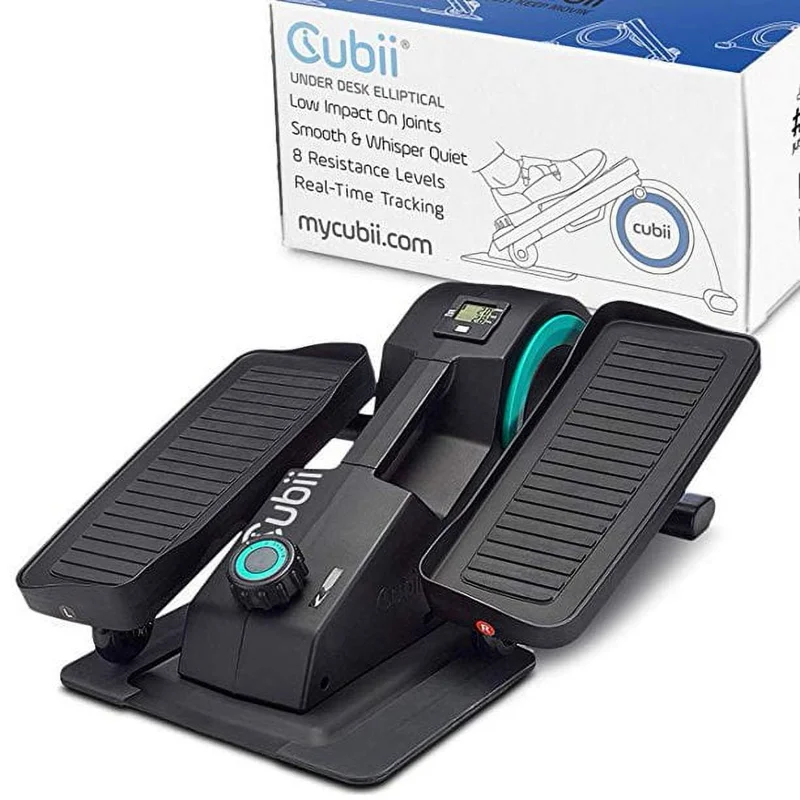
I reach for the Cubii JR1 when someone wants a real elliptical glide under a desk. The pedals travel along an oval, which loads thighs and calves without the knee circling of a bike.
Its weight keeps it planted on carpet, though carrying it between rooms is a two-handed lift. The display sits on the unit itself, so a glance means looking down at the floor.
Eight resistance levels run from easy recovery pedaling to a firm leg session, and each step is easy to feel.
Specs
| Motion | Seated elliptical |
|---|---|
| Resistance | 8 levels |
| Tracking | Built-in LCD |
3 - Stamina InMotion E1000 (Best Motorized Pick)

Pros and Cons
Pros
- The remote changes pace from the chair
- The legs can rest while the motor works
- Four programs add variety to the day
Cons
- Squeaks can appear as the machine wears in
Who is it for?
Who is it for?
- Anyone with stiff knees who prefers passive movement
- Remote workers who want hands-free pedaling
Who is it not for?
- Lifters who want real resistance training
The motor on the Stamina InMotion E1000 turns the pedals, so my legs stayed loose while a wireless remote changed the speed and the direction. That left both hands free for typing and made a long call feel like a break.
Squeaking is the usual flaw with the moving parts, so I would listen for it on day one and again after a few weeks. The motor also sets the pace for the whole session, so effort never rises above the speed the remote selects.
Specs
| Motion | Motorized elliptical, forward or reverse |
|---|---|
| Resistance | Magnetic, 12 speed levels |
| Tracking | LED console and remote |
4 - MagneTrainer (Best Stepless Resistance)

Pros and Cons
Pros
- The dial lands between fixed steps
- Pedals turn in both directions
- Doubles as a tabletop arm cycle
Cons
- Creeps forward on smooth floors at hard settings
Who is it for?
Who is it for?
- Desk workers who want exact control of effort
- People who also want a tabletop arm cycle
Who is it not for?
- Anyone on slick hardwood without a mat
A five-turn dial sets the resistance on the MagneTrainer, so I could land between the fixed steps that most machines force on you and nudge it by a hair mid-call.
It pedals forward or backward and works on a tabletop as an arm cycle, which gives stiff shoulders something to do on a long afternoon. On a smooth floor it can creep forward at the hardest settings.
The LCD shows speed, time, distance and estimated calories during a session without needing a phone or an app.
Specs
| Motion | Cycling, forward or backward |
|---|---|
| Resistance | Magnetic, stepless dial |
| Tracking | LCD |
5 - Cubii Pro (Best for Fitbit and Apple Health Sync)

Pros and Cons
Pros
- Syncs activity with Fitbit and Apple Health
- Roomy pedals take bulky shoes
- Glides smoothly at low tension
Cons
- Full session history needs the phone app
Who is it for?
Who is it for?
- Fitbit and Apple Health users who log daily activity
- People who wear bulky shoes at the desk
Who is it not for?
- Anyone who does not track activity on a phone
Pedaling data lands in Fitbit or Apple Health without any typing, which is the real reason I rate the Cubii Pro highly for people who already track their days and want one daily total to check at the end of the workday.
Large pedals took my bulkier shoes without crowding my feet, and the glide stayed smooth when I eased the tension down for a long call. At the higher levels the pedals asked for a firmer push on each stroke through the full range.
Specs
| Motion | Seated elliptical |
|---|---|
| Resistance | Adjustable levels |
| Tracking | Bluetooth app |
6 - Cubii Go (Best Cubii for Finer Resistance Steps)
Pros and Cons
Pros
- Fine steps suit gentle recovery pedaling
- The screen and the app both log sessions
- A little lighter than the other Cubii models
Cons
- Still a two-handed carry between rooms
Who is it for?
Who is it for?
- Seated workers who want finer control of effort
- Home users who move the machine between rooms
Who is it not for?
- Shoppers who want a basic machine without an app
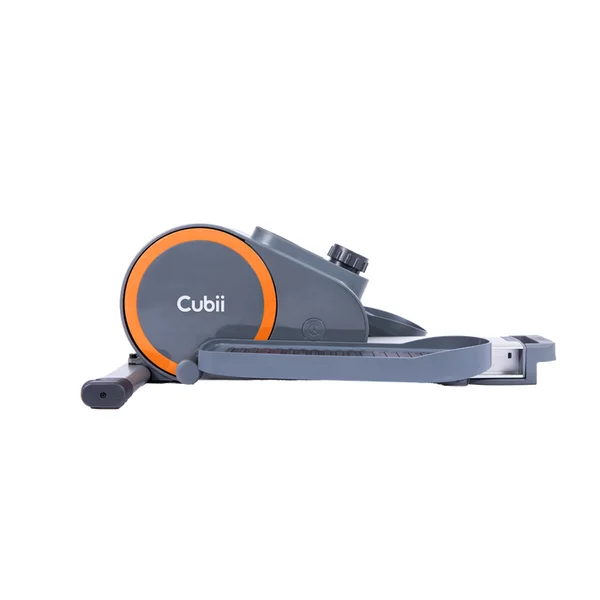
Ten resistance levels give the Cubii Go finer steps than the eight on the JR1. That let me dial in a recovery pace after a hard day, and each step is easy to feel under the foot without the app.
A built-in display tracks each session and the app keeps the history, so the numbers are easy to review after work. The unit weighs a little less than the other Cubii models here, though it is still a two-handed carry between rooms.
Specs
| Motion | Seated elliptical |
|---|---|
| Resistance | 10 levels |
| Tracking | LCD and app |
7 - Sunny Health & Fitness (Best for Extras In The Box)

Pros and Cons
Pros
- Bands and a mat add arm and floor work
- The carry handle makes it easy to stash
- The free app adds guided workouts
Cons
- Top resistance feels gentle for strong legs
Who is it for?
Who is it for?
- Home users who want arm and leg work in one kit
- Beginners who like guided app workouts
Who is it not for?
- Anyone who wants strong resistance
Two resistance bands and a grip mat come in the Sunny Health & Fitness box, which turns a pedal exerciser into a small arm and leg kit for a home office.
The bands let me add shoulder rows between pedaling sets, and the carry handle makes it easy to tuck the unit beside the desk once the workday ends.
The mesh-belt drive stays fairly quiet at low levels, though its resistance feels gentler than the magnetic machines on this list, even at the top of the range.
Specs
| Motion | Cycling for legs or arms |
|---|---|
| Resistance | Mesh belt, 8 levels |
| Tracking | LCD and SunnyFit app |
8 - FitDesk (Best for Low Desks)

Pros and Cons
Pros
- The foot shifter keeps hands on the keyboard
- Wide textured pedals grip shoes well
- Clears knees under low desks
Cons
- Noise rises at the hardest levels
Who is it for?
Who is it for?
- Workers with low desks
- Typists who change resistance mid-task
Who is it not for?
- Open-plan offices that need near silence
I could slide the FitDesk far back under a low desk, because its pedals sit low enough to clear my knees where taller machines would bump them on every upstroke.
A foot shifter changes the resistance through eight even steps. I never had to reach down or break my typing rhythm for a small tweak.
Wide textured pedals gave my shoes a steady grip, though noise rises at the top levels, which matters more in a shared office than at home.
Specs
| Motion | Pedal cycling |
|---|---|
| Resistance | Magnetic, 8 levels, foot shifter |
| Tracking | Digital display |
9 - Ativafit (Best for Standing Use)

Pros and Cons
Pros
- Works for seated and upright sessions
- Reverse pedaling shifts the load to the calves
- Textured pedals hold shoes firmly
Cons
- The pedals can squeak with regular use
Who is it for?
Who is it for?
- Users who stand for part of the workday
- Anyone who wants more calf work
Who is it not for?
- Anyone who needs a silent machine
I would only pick the Ativafit for sessions that mix seated and standing pedaling, since it is built for both.
Reversing the pedals shifted the load toward my calves and gave my legs a different feel halfway through a session. Textured pedals held my shoes at every tension, even when I stood up for the last few minutes.
The tension dial works by feel more than by number, and the pedals squeak now and then, which a drop of lubricant on the pivots usually quiets.
Specs
| Motion | Forward or reverse, seated or standing |
|---|---|
| Resistance | Tension dial |
| Tracking | LCD |
10 - Vaunn (Best Budget Pick)

Pros and Cons
Pros
- Folds away in seconds
- Arrives ready to use
- Light enough to carry one-handed
Cons
- Slides on hard floors without a mat
Who is it for?
Who is it for?
- Shoppers who want to try a pedal exerciser cheaply
- Travelers who need a foldable unit
Who is it not for?
- Anyone who needs firm resistance
The Vaunn weighs little more than a laptop bag, which makes it the easiest way to test whether a pedal exerciser sticks in your routine. It folds flat and arrives assembled, so it was ready straight out of the box.
Five tension steps keep it to gentle, steady pedaling through a long call, and a light frame slides on hard floors, so I set it against a wall or a mat. Nothing locks it to a chair, so the chair needs its own stop.
Specs
| Motion | Pedal cycling, foldable |
|---|---|
| Resistance | Tension knob, 5 levels |
| Tracking | LCD |
11 - Techmoo (Best for Desktop Arm Work)

Pros and Cons
Pros
- Foot straps fit different shoe sizes
- Light enough to lift onto a desk
- Grip pads and a strap hold it still
Cons
- Top resistance stays mild
Who is it for?
Who is it for?
- People who want gentle movement during calls
- Anyone who wants an arm exerciser for the desktop
Who is it not for?
- Fit users chasing a real workout
The Techmoo folds up light enough to lift onto a desk, where its pedals double as hand cranks for arm work during a call or while reading.
Foot straps hold different shoe sizes and four pads grip the floor. The unit stayed put under gentle pedaling and the tension knob adds friction as it turns.
Strong legs will find even the top setting too easy for a real cardio session, whether the unit sits on the desk or under it.
Specs
| Motion | Pedal cycling, legs or arms |
|---|---|
| Resistance | Tension knob |
| Tracking | LCD |
12 - Ancheer (Best for Easy Seated Movement)

Pros and Cons
Pros
- Pedals turn forward or backward
- The readout needs no phone
- A compact frame fits low gaps
Cons
- The motor hum carries in a quiet room
- Effort stays low, so it adds little cardio
Who is it for?
Who is it for?
- People with tight calves after long sitting
- Users who prefer passive hands-free movement
Who is it not for?
- Anyone training for cardio fitness
A motor turns the pedals of the Ancheer forward or backward. The legs stay relaxed from the first minute to the last.
That passive motion suits tight calves after a long sitting block, though it will not raise the heart rate the way a resistance machine does or build real leg strength over time.
The motor hums in a way a silent flywheel never does, and the built-in display reads time, speed and calories so a session needs no phone.
Specs
| Motion | Motorized, forward or backward |
|---|---|
| Resistance | 5 speeds and 3 programs |
| Tracking | LCD |
How did I choose these under desk machines?
I bought and used each machine under my own desk, then scored it on noise, pedal clearance, stability on carpet and hard floor, and how easily the resistance changes while typing. Setup effort and a readable display counted too.
The five scores are durability, build quality, effectiveness, price and the store's star rating. The user score follows each machine's star rating on the store it links to, and the price score follows its current store price.
Noise got its own check because an office is the usual home for these machines. I listened for squeaks, clicks and motor whine at low and high resistance.
How do you choose an under desk elliptical?
You choose an under desk elliptical by weighing four factors, starting with the factor that rules out the most machines. Start with desk clearance, then noise, stability and tracking.
How much desk clearance does an under desk elliptical need?
An under desk elliptical needs pedals that sit well below your knees, which makes desk clearance the first thing to check. Measure the gap between the floor and the underside of your desk, then compare that gap with the maker's pedal height.
Bike-style machines keep the knees moving in a small circle, while ellipticals glide the feet along a longer arc. The longer arc needs more room in front of the chair.
Which resistance type is quietest?
Magnetic resistance is the quietest type, because nothing rubs against the flywheel. Friction and air systems get louder as you raise the setting, and that noise carries across a quiet office.
How do you stop an under desk elliptical from sliding?
You stop an under desk elliptical from sliding with a grippy mat under the unit and a wall behind it. Light frames move first on hard floors, so a rubber or yoga mat matters more there than on carpet.
Do you need a display or an app?
You need a display more than an app, since a screen shows cadence and time without a phone. Bluetooth sync only adds value if you already log your daily totals in Fitbit or Apple Health.
Is an under desk elliptical better than an under desk bike?
An under desk elliptical is better than an under desk bike when you want a gliding stride, while a bike is better when clearance is tight. The foot path is the real difference between them.
Ellipticals such as the Cubii JR1 move the feet along an oval that works the calves and thighs together. Bikes such as the DeskCycle fit lower desks, and several of them double as arm cycles on a tabletop.
If you have room for a full-size machine instead, Best Budget Elliptical Machines compares upright ones.
Which under desk ellipticals are quiet enough for an office?
The under desk ellipticals quiet enough for an office are the DeskCycle, MagneTrainer and Cubii Pro, which all run without rubbing parts. Their flywheels leave little to hear beyond a soft hum.
The Stamina InMotion E1000 and the Ancheer add motor sound, and the Ativafit and FitDesk get louder at high resistance.
What are the best low-cost under desk ellipticals?
The best low-cost under desk ellipticals are the Vaunn, Ativafit, Sunny Health & Fitness and Stamina InMotion E1000, which each sat at or under roughly $150 when I last checked prices.
The DeskCycle sits right at that line, so check its current price before you decide on a budget.
Who should skip an under desk elliptical?
Skip an under desk elliptical if your desk leaves almost no room above the pedals, because knees that hit the underside will cut every session short.
People who need real cardio should also look elsewhere, since every pick here is a low-effort leg mover and not a heart-rate workout. A brisk walk does more for fitness than any of them.
FAQs
How many calories does an under desk elliptical burn?
An under desk elliptical burns a modest number of calories, far fewer than a brisk walk, because the effort stays light.
The display estimates calories from cadence and resistance, so I do not read it as an exact score. Treating the figure as a daily trend keeps it useful, since a single session number swings with how hard I push.
Can you use an under desk elliptical while standing?
You can use an under desk elliptical while standing only if the maker allows it, and the Ativafit is the one on this list built for both seated and upright use.
Other machines here are designed for seated use, and stepping onto a light plastic frame risks a slip or a cracked pedal arm. Check each maker's weight and use guidance first.
How do you stop a chair from rolling while you use an under desk elliptical?
You stop a chair from rolling while you use an under desk elliptical by locking its casters or parking the chair against a wall.
Hard pedaling pushes the chair backward, so a chair mat or a doorstop behind one wheel works better than leaning on the desk.
My Verdict on the Best Under Desk Ellipticals
If you want a machine that stays quiet through a video call, buy the DeskCycle. Its flywheel keeps a soft hum from the lightest dial setting to the hardest, so a shared office will not notice you pedaling.
It suits office workers who take calls while they pedal and want strapped pedals and a display they can read at a glance. Know that the motion is cycling rather than a true elliptical glide.
Open the box below for today's price, then book your first pedaling session into your workday.
Our #1 Recommendation
DeskCycle (Best Overall)
Rated With Total Shape's Scoring System

- Stays quiet through the whole dial range
- Strapped pedals keep feet from sliding
- The screen moves to a desk stand for easy reading
- The flywheel keeps the stroke smooth
- The pedal straps need a quick tweak for each pair of shoes
About The Author


You May Also Like